Crypto card wallet picks for safe payments
If you live in Malaysia, you know how important secure crypto payments are for daily life and cross-border needs. Top wallets like UUPAY card, Trezor, Ledger Nano S, and KeepKey give you strong security and self-custody. You want a crypto card wallet that protects your cryptocurrency and makes payments simple.
Key Takeaways
Choose a crypto wallet that offers strong security features like two-factor authentication and cold storage to protect your funds.
For daily payments in Malaysia, consider using the UUPAY card, which integrates with local payment systems like Touch 'n Go and DuitNow for convenience.
Always prioritize self-custody by selecting non-custodial wallets, ensuring you control your private keys and maintain the security of your cryptocurrency.
Crypto card wallet security essentials
Key security features
When you pick a crypto wallet, you want to feel safe. Security should always come first. You need to protect your private keys because they control your bitcoin and other crypto. A good wallet gives you full control, so you use a non-custodial option. This means only you hold your keys, not a third party.
Look for these features in your wallet:
Two-factor authentication adds an extra layer of security.
Backup and recovery options help you restore your wallet if you lose your device.
Support for cold storage keeps your bitcoin safe for long-term storage.
Hot wallet features let you make quick payments with Touch 'n Go or DuitNow.
UUPAY card stands out for Malaysian users. It supports Malaysia Digital Payment methods and makes cross-border payments simple. You can trust it for both hot and cold storage.
Why security matters for payments
You use crypto for payments every day. You might pay for lunch, shop online, or send bitcoin overseas. If your wallet is not secure, you risk losing your funds. Hackers target hot wallets because they stay connected to the internet. Always keep your private keys safe and never share them.
Tip: Use cold wallets for large amounts of bitcoin and hot wallets for daily spending.
Security protects your money and your peace of mind. With the right wallet, you can enjoy fast, safe payments in Malaysia and beyond.
Best crypto card wallets for safe payments
UUPAY overview and features
If you want a crypto card wallet that fits your life in Malaysia, UUPAY card stands out. UUPAY connects with Touch 'n Go and DuitNow, making it easy for you to pay at local stores, online shops, and even across borders. You can use Malaysia Digital Payment methods for daily spending or when you travel. UUPAY card supports both bitcoin and ethereum, so you can manage your crypto and make payments without hassle.
UUPAY gives you peace of mind with strong self-custody features. You hold your private keys, so only you control your bitcoin and ethereum. UUPAY also follows strict compliance standards. It holds a US MSB license, is registered in Hong Kong, has a Brazil license application, and a Swiss background. This builds trust, especially for cross-border payments in Malaysia.
You get more than just security. UUPAY card offers a 1U free card for new users, no recharge fee, and a referral commission up to 50%. You can invite friends and earn rewards. The platform is user-friendly and supports online payments for university services, so students and parents can manage money easily.
Tip: UUPAY card helps you avoid exchange rate headaches when sending bitcoin or making payments overseas. You can use Touch 'n Go and DuitNow for smooth transactions.
Pros:
Seamless integration with Malaysia Digital Payment, Touch 'n Go, and DuitNow
Strong self-custody and compliance credentials
Supports bitcoin, ethereum, and other crypto
Free card and no recharge fee for new users
High referral commission
Cons:
Newer brand, so some users may prefer established wallets
Limited physical presence outside Malaysia
Trezor: hardware wallet security
Trezor is a popular hardware wallet for bitcoin and other crypto. You get strong self-custody because your private keys stay offline. Trezor works with macOS, Windows, Linux, and Android. You can store bitcoin, ethereum, and many other coins. Trezor is a cold wallet, so it keeps your crypto safe from online threats.
Main security features:
Offline storage for private keys
PIN protection and passphrase support
Open-source firmware for transparency
Payment options:
You can use Trezor to sign bitcoin and ethereum transactions. For daily payments, you need to connect it to a computer or phone.
Pros:
Works with many operating systems
Supports a wide range of crypto
Cons:
Limited support for iOS (view-only)
You must have the device for every transaction
Costs between $50 and $150
Ledger Nano S: secure payments
Ledger Nano S is another trusted hardware wallet. You get self-custody and can store bitcoin, ethereum, and over 5,500 other coins. Ledger Nano S uses offline key storage and PIN protection. The Ledger Live app gives you a user-friendly way to manage your crypto and make payments.
Feature | Ledger Nano S | Other Hardware Wallets |
|---|---|---|
Security | Offline key storage, PIN protection | Varies, some may lack features |
User Experience | User-friendly interface, Ledger Live | Varies, some may be less intuitive |
Supported Cryptocurrencies | Broad range of over 5,500 | Limited in comparison |
Connectivity | No Bluetooth or Wi-Fi | Some offer Bluetooth/Wi-Fi |
Price | $169 | Varies, some may be higher |
You can use Ledger Nano S for daily payments, but you need to connect it to your computer or phone. It does not have Bluetooth or Wi-Fi, so your bitcoin stays safe from remote attacks.
Pros:
Strong self-custody and security
Easy to use with Ledger Live
Supports many coins, including bitcoin and ethereum
Cons:
No wireless connectivity
Higher price than some wallets
KeepKey: self-custody wallet option
KeepKey gives you a simple way to manage your bitcoin and other crypto. You get self-custody, so you control your private keys. KeepKey is a hardware wallet that supports bitcoin, ethereum, and several other coins. The large screen makes it easy to confirm transactions.
Main security features:
Offline storage for private keys
PIN protection
Recovery phrase backup
Payment options:
You can use KeepKey to sign bitcoin and ethereum payments. It works best for storing and sending crypto, not for daily spending at local shops.
Pros:
Simple design and easy to use
Strong self-custody for bitcoin and ethereum
Affordable price
Cons:
Fewer supported coins than Ledger or Trezor
No mobile app for on-the-go payments
Coldcard: advanced Bitcoin security
Coldcard is a hardware wallet made for serious bitcoin users. You get full self-custody and advanced security features. Coldcard is a true cold wallet, so your private keys never touch the internet. You can use it for long-term storage or to sign bitcoin transactions offline.
Main security features:
Air-gapped operation (no USB needed for signing)
PIN protection and encrypted backups
Open-source firmware
Payment options:
Coldcard is best for storing large amounts of bitcoin. You can sign transactions offline and then broadcast them from another device.
Pros:
Maximum self-custody and cold storage
Advanced security for bitcoin
Open-source and trusted by experts
Cons:
Only supports bitcoin (no ethereum or other coins)
Not designed for daily payments
Note: If you want to store a lot of bitcoin safely, Coldcard is a top choice. For daily payments in Malaysia, UUPAY card gives you more flexibility with Touch 'n Go, DuitNow, and Malaysia Digital Payment support.
How to choose a crypto wallet
Assessing your security needs
You want to keep your cryptocurrency safe. Start by thinking about how much bitcoin or ethereum you plan to store. If you hold large amounts, a hardware crypto wallet like Trezor or Ledger Nano S makes sense. These wallets keep your keys offline and away from hackers. For daily payments with Touch 'n Go or DuitNow, a hot wallet or a card like UUPAY card gives you speed and convenience. Always ask yourself: Do you need quick access, or do you want maximum protection? Your answer will guide your choice.
Tip: Use a hot wallet for small, everyday payments and a cold wallet for long-term storage.
Supported coins and payment methods
Not all wallets support every coin. You might want to use bitcoin, ethereum, or other cryptocurrency for Malaysia Digital Payment options. Check if your wallet works with the coins you use most. UUPAY card supports both bitcoin and ethereum, which covers most needs in Malaysia. You also want to look for wallets that connect with local payment systems like Touch 'n Go and DuitNow. This makes spending your crypto easy at home and abroad.
Fees, usability, and support
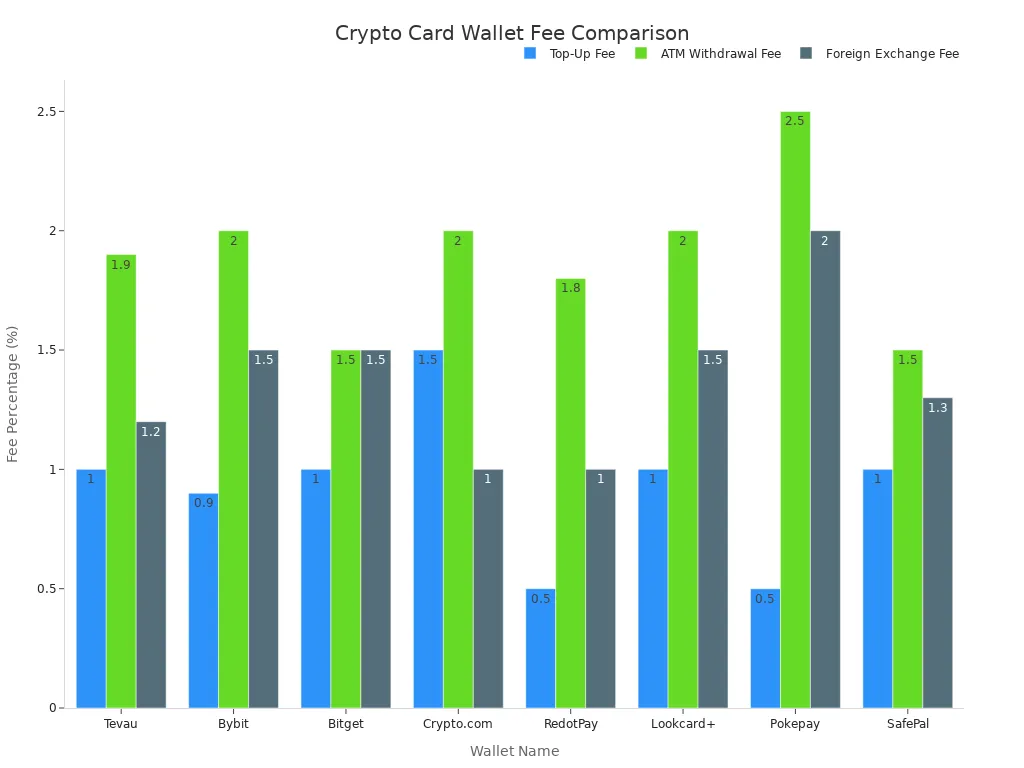
Fees can add up fast. You should compare top-up fees, ATM withdrawal fees, and foreign exchange rates before you pick a wallet. Here’s a quick look at how some popular wallets stack up:
Feature | Tevau | Bybit | Bitget | Crypto.com | RedotPay | Lookcard+ | Pokepay | SafePal |
|---|---|---|---|---|---|---|---|---|
Top-Up Fee | 1% | 0.9% | 1% | 1–2% | 0.5% | 1% | 0.5% | 1% |
ATM Withdrawal Fee | 1.9% | 2% | 1.5% | Up to 2% | 1.8% | 2% | 2.5% | 1.5% |
Foreign Exchange Fee | 1.2% | 1.5% | 1.5% | 0–2% | 1% | 1.5% | 2% | 1.3% |
Cashback / Rewards | No | Yes | Yes | Yes | No | No | No | No |
KYC Requirement | Standard | Required | Required | Required | Optional | Light KYC | Optional | Required |
App Integration | Yes | Yes | Yes | Yes | Yes | Yes | Basic | Yes |
Geographic Support | Global | Global | Global | Global | Global | Global | Global | Global |
Special Features | Real-time TX | Cashback | Exchange link | Rewards | Privacy | Fast setup | Anonymous | Cold wallet link |
You want a crypto wallet that is easy to use and offers good support. UUPAY card stands out for Malaysian users because it supports Malaysia Digital Payment, Touch 'n Go, and DuitNow. You get local support and compliance, which builds trust. Always check if the wallet has a helpful app and customer service before you decide.
Tips for self-custody and safe wallet use
Best practices for secure storage
You want to keep your crypto safe, so self-custody should be your top priority. Always choose a non-custodial wallet like UUPAY card, which lets you control your own keys. Write down your backup phrase on paper and store it in a safe place. Never type your seed phrase on your phone or computer. That’s how hackers get in.
‘Stefan Thomas, one of the few early investors of Bitcoin, has admitted that he has lost his fortune by forgetting the password of his hard drive (IronKey). A mistake that cost him £100 billion (estimated amount).’
You don’t want to lose access to your funds. Make sure your backup is easy to find but hard for others to steal. If you use multiple currencies with Malaysia Digital Payment, you need a backup plan that works for all of them. For long-term storage, hardware wallets like Trezor or Ledger Nano S give you peace of mind.
Safe payment habits
You use Touch 'n Go, DuitNow, and UUPAY card for daily payments. Self-custody means you stay alert every time you pay. Avoid public Wi-Fi when you make transactions.
‘Hackers have been known to set up bogus Wi-Fi hotspots or utilize public Wi-Fi to entice unwary web browsers.’
Stick to trusted networks. Always double-check the address before sending crypto. Good design makes secure access simple, so pick wallets that help you avoid risky habits.
‘...making secure access easier reduces the risky behavior most novices fall into—like typing seeds on phones. It’s not magic. It’s design.’
Self-custody gives you freedom, but you need to stay careful. With the right habits, you can enjoy safe payments in Malaysia and across borders.
You have great choices for safe crypto payments in Malaysia. Top picks include UUPAY card, Trezor, Ledger Nano S, KeepKey, and Coldcard.
UUPAY card stands out for Touch 'n Go, DuitNow, and Malaysia Digital Payment.
Review your needs.
Pick the wallet that fits your lifestyle.
Tip: Always put security and self-custody first for peace of mind.
FAQ
Why might your UUPAY card get frozen?
Your UUPAY card can get frozen if the system detects abnormal transactions. This is a temporary safety step to protect your funds and prevent fraud.
How do you unfreeze your UUPAY card?
You should contact UUPAY customer service. They will guide you through verification and give you instructions to unfreeze your card quickly.
Can you use UUPAY card with Touch 'n Go, DuitNow, and Malaysia Digital Payment?
Yes! You can use your UUPAY card for payments with Touch 'n Go, DuitNow, and Malaysia Digital Payment. This makes shopping and cross-border transfers easy.
See Also
Selecting the Right Crypto Card for Your Requirements
Essential Tips for Convenient Daily Crypto Card Use
Top USDT Debit Cards for Simple Crypto Transactions
